boundless.exe threw unhandled win32 exception in both crashes (woops).
Since I have Microsoft Visual Studio 2015 Enterprise Edition installed with Just In Time debugger enabled on my gaming rig it wants to run debugger.
Before going into that I’ll explain how boundless.exe crashing impacts my Windows 10 64-bit desktop. My mouse continues to partially work while the keyboard seems fully functional. For example, I can click Windows key on keyboard, which opens Windows menu with all my apps, then I can use mouse to mouse over and highlight a shortcut (didn’t try clicking any). In other windows (Chrome, Task Manager, Visual Studio) the mouse will not work that I can tell (no highlighting text, clicking in menus, exiting using upper right X icon). My keyboard is fully functional. Since I sometimes rely on keyboard shortcuts anyway I can generally navigate through Task Manager and Visual Studio windows selecting menu items and doing shortcuts. After I terminate boundless.exe in Task Manager using keyboard shortcuts (mouse doesn’t work at this point) then mouse will behave normally. Both mouse and keyboard are USB.
Also, this particular gaming rig uses two NVidia 770GTX cards and has ShadowPlay enabled. I used the keyboard shortcut to save the previous 5 minutes of desktop / boundless gaming to an .mp4 file so you have option to see what I did a few minutes right up to crash and after the crash. I didn’t think about using ShadowPlay the first time boundless.exe crashed but I did the second time (and run the debugger). If you want the 5m video I can SFTP it to you, or I can send you SFTP credentials on one of my servers. The file is a 845 MB .mp4 file (5 minutes at 1920 x 1080 @ 59 Hz).
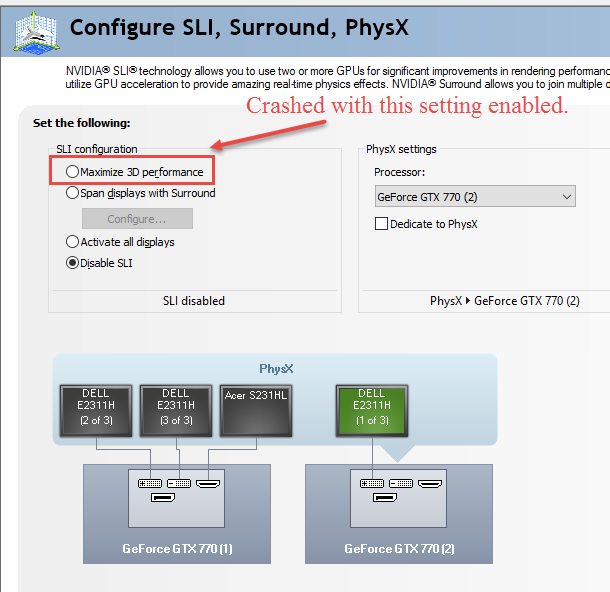
I haven’t tried to play boundless in NVidia Surround spanning three monitors because I’m not sure if you support 5760x1080 (it looked goofy a year ago) and I can’t use ShadowPlay while spanning three monitors. I do have NVidia SLI enabled set to maximize 3D performance which also allows me to use ShadowPlay and save game experience after the game crashes.
I wasn’t able to get far in debug mode (I’m kind of new at using VS) but here is what debug output showed at bottom:
'boundless.exe' (Win32): Loaded 'E:\Program Files (x86)\Steam\SteamApps\common\Oort Online\boundless.exe'.
Cannot find or open the PDB file.
'boundless.exe' (Win32): Loaded 'C:\Windows\System32\ntdll.dll'. Cannot find or open the PDB file.
'boundless.exe' (Win32): Loaded 'C:\Windows\System32\kernel32.dll'. Cannot find or open the PDB file.
'boundless.exe' (Win32): Loaded 'C:\Windows\System32\KernelBase.dll'. Cannot find or open the PDB file.
'boundless.exe' (Win32): Loaded 'C:\Windows\System32\ws2_32.dll'. Cannot find or open the PDB file.
'boundless.exe' (Win32): Loaded 'C:\Windows\System32\sechost.dll'. Cannot find or open the PDB file.
'boundless.exe' (Win32): Loaded 'C:\Windows\System32\rpcrt4.dll'. Cannot find or open the PDB file.
'boundless.exe' (Win32): Loaded 'C:\Windows\System32\user32.dll'. Cannot find or open the PDB file.
'boundless.exe' (Win32): Loaded 'C:\Windows\System32\win32u.dll'. Cannot find or open the PDB file.
'boundless.exe' (Win32): Loaded 'C:\Windows\System32\gdi32.dll'. Cannot find or open the PDB file.
'boundless.exe' (Win32): Loaded 'C:\Windows\System32\gdi32full.dll'. Cannot find or open the PDB file.
'boundless.exe' (Win32): Loaded 'C:\Windows\System32\advapi32.dll'. Cannot find or open the PDB file.
'boundless.exe' (Win32): Loaded 'C:\Windows\System32\msvcrt.dll'. Cannot find or open the PDB file.
'boundless.exe' (Win32): Loaded 'C:\Windows\System32\comdlg32.dll'. Cannot find or open the PDB file.
'boundless.exe' (Win32): Loaded 'C:\Windows\System32\combase.dll'. Cannot find or open the PDB file.
'boundless.exe' (Win32): Loaded 'C:\Windows\System32\ucrtbase.dll'. Cannot find or open the PDB file.
'boundless.exe' (Win32): Loaded 'C:\Windows\System32\bcryptprimitives.dll'. Cannot find or open the PDB file.
'boundless.exe' (Win32): Loaded 'C:\Windows\System32\SHCore.dll'. Cannot find or open the PDB file.
'boundless.exe' (Win32): Loaded 'C:\Windows\System32\shlwapi.dll'. Cannot find or open the PDB file.
'boundless.exe' (Win32): Loaded 'C:\Windows\System32\shell32.dll'. Cannot find or open the PDB file.
'boundless.exe' (Win32): Loaded 'C:\Windows\System32\cfgmgr32.dll'. Cannot find or open the PDB file.
'boundless.exe' (Win32): Loaded 'C:\Windows\WinSxS\amd64_microsoft.windows.common-controls_6595b64144ccf1df_5.82.14393.447_none_0d5aa7fbb6d35646\comctl32.dll'. Cannot find or open the PDB file.
'boundless.exe' (Win32): Loaded 'C:\Windows\System32\windows.storage.dll'. Cannot find or open the PDB file.
'boundless.exe' (Win32): Loaded 'C:\Windows\System32\powrprof.dll'. Cannot find or open the PDB file.
'boundless.exe' (Win32): Loaded 'C:\Windows\System32\kernel.appcore.dll'. Cannot find or open the PDB file.
'boundless.exe' (Win32): Loaded 'C:\Windows\System32\profapi.dll'. Cannot find or open the PDB file.
'boundless.exe' (Win32): Loaded 'C:\Windows\System32\imm32.dll'. Cannot find or open the PDB file.
'boundless.exe' (Win32): Loaded 'C:\Windows\System32\setupapi.dll'. Cannot find or open the PDB file.
'boundless.exe' (Win32): Loaded 'C:\Windows\System32\ole32.dll'. Cannot find or open the PDB file.
'boundless.exe' (Win32): Loaded 'E:\Program Files (x86)\Steam\SteamApps\common\Oort Online\steam_api64.dll'. Cannot find or open the PDB file.
'boundless.exe' (Win32): Loaded 'C:\Windows\System32\msvcp140.dll'. Cannot find or open the PDB file.
'boundless.exe' (Win32): Loaded 'C:\Windows\System32\vcruntime140.dll'. Cannot find or open the PDB file.
'boundless.exe' (Win32): Loaded 'C:\Windows\System32\dbghelp.dll'. Cannot find or open the PDB file.
'boundless.exe' (Win32): Loaded 'C:\Windows\System32\version.dll'. Cannot find or open the PDB file.
'boundless.exe' (Win32): Loaded 'C:\Windows\System32\d3d11.dll'. Cannot find or open the PDB file.
'boundless.exe' (Win32): Loaded 'E:\Program Files (x86)\Steam\SteamApps\common\Oort Online\d3dcompiler_47.dll'. Cannot find or open the PDB file.
'boundless.exe' (Win32): Loaded 'C:\Windows\System32\winmm.dll'. Cannot find or open the PDB file.
'boundless.exe' (Win32): Loaded 'C:\Windows\System32\XInput9_1_0.dll'. Cannot find or open the PDB file.
'boundless.exe' (Win32): Loaded 'C:\Windows\System32\hid.dll'. Cannot find or open the PDB file.
'boundless.exe' (Win32): Loaded 'C:\Windows\System32\dxgi.dll'. Cannot find or open the PDB file.
'boundless.exe' (Win32): Loaded 'C:\Windows\System32\winmmbase.dll'. Cannot find or open the PDB file.
'boundless.exe' (Win32): Loaded 'C:\Windows\System32\dbgcore.dll'. Cannot find or open the PDB file.
'boundless.exe' (Win32): Loaded 'C:\Program Files (x86)\Steam\GameOverlayRenderer64.dll'. Cannot find or open the PDB file.
'boundless.exe' (Win32): Loaded 'C:\Windows\System32\psapi.dll'. Cannot find or open the PDB file.
'boundless.exe' (Win32): Loaded 'C:\Windows\System32\uxtheme.dll'. Cannot find or open the PDB file.
'boundless.exe' (Win32): Loaded 'C:\Windows\System32\msctf.dll'. Cannot find or open the PDB file.
'boundless.exe' (Win32): Loaded 'C:\Windows\System32\oleaut32.dll'. Cannot find or open the PDB file.
'boundless.exe' (Win32): Loaded 'C:\Windows\System32\msvcp_win.dll'. Cannot find or open the PDB file.
'boundless.exe' (Win32): Loaded 'C:\Windows\System32\dwmapi.dll'. Cannot find or open the PDB file.
'boundless.exe' (Win32): Loaded 'C:\Windows\System32\clbcatq.dll'. Cannot find or open the PDB file.
'boundless.exe' (Win32): Loaded 'C:\Windows\System32\MMDevAPI.dll'. Cannot find or open the PDB file.
'boundless.exe' (Win32): Loaded 'C:\Windows\System32\propsys.dll'. Cannot find or open the PDB file.
'boundless.exe' (Win32): Loaded 'C:\Windows\System32\devobj.dll'. Cannot find or open the PDB file.
'boundless.exe' (Win32): Loaded 'C:\Windows\System32\AudioSes.dll'. Cannot find or open the PDB file.
'boundless.exe' (Win32): Loaded 'C:\Windows\System32\WinTypes.dll'. Cannot find or open the PDB file.
'boundless.exe' (Win32): Loaded 'C:\Program Files (x86)\Steam\steamclient64.dll'. Cannot find or open the PDB file.
'boundless.exe' (Win32): Loaded 'C:\Windows\System32\crypt32.dll'. Cannot find or open the PDB file.
'boundless.exe' (Win32): Loaded 'C:\Windows\System32\msasn1.dll'. Cannot find or open the PDB file.
'boundless.exe' (Win32): Loaded 'C:\Windows\System32\imagehlp.dll'. Cannot find or open the PDB file.
'boundless.exe' (Win32): Loaded 'C:\Windows\System32\IPHLPAPI.DLL'. Cannot find or open the PDB file.
'boundless.exe' (Win32): Loaded 'C:\Program Files (x86)\Steam\vstdlib_s64.dll'. Cannot find or open the PDB file.
'boundless.exe' (Win32): Loaded 'C:\Program Files (x86)\Steam\tier0_s64.dll'. Cannot find or open the PDB file.
'boundless.exe' (Win32): Loaded 'C:\Windows\System32\secur32.dll'. Cannot find or open the PDB file.
'boundless.exe' (Win32): Loaded 'C:\Windows\System32\sspicli.dll'. Cannot find or open the PDB file.
'boundless.exe' (Win32): Loaded 'C:\Windows\System32\cryptbase.dll'. Cannot find or open the PDB file.
'boundless.exe' (Win32): Loaded 'C:\Windows\System32\wintrust.dll'. Cannot find or open the PDB file.
'boundless.exe' (Win32): Loaded 'C:\Windows\System32\opengl32.dll'. Cannot find or open the PDB file.
'boundless.exe' (Win32): Loaded 'C:\Windows\System32\glu32.dll'. Cannot find or open the PDB file.
'boundless.exe' (Win32): Loaded 'C:\Windows\System32\ddraw.dll'. Cannot find or open the PDB file.
'boundless.exe' (Win32): Loaded 'C:\Windows\System32\dciman32.dll'. Cannot find or open the PDB file.
'boundless.exe' (Win32): Loaded 'C:\Windows\System32\nvoglv64.dll'. Cannot find or open the PDB file.
'boundless.exe' (Win32): Loaded 'C:\Windows\System32\wtsapi32.dll'. Cannot find or open the PDB file.
'boundless.exe' (Win32): Loaded 'C:\Windows\System32\ntmarta.dll'. Cannot find or open the PDB file.
'boundless.exe' (Win32): Loaded 'C:\Windows\System32\DriverStore\FileRepository\nv_dispi.inf_amd64_410e5247be0e5f00\nvwgf2umx.dll'. Cannot find or open the PDB file.
'boundless.exe' (Win32): Loaded 'C:\Windows\System32\bcrypt.dll'. Cannot find or open the PDB file.
'boundless.exe' (Win32): Loaded 'C:\Windows\System32\nvspcap64.dll'. Cannot find or open the PDB file.
'boundless.exe' (Win32): Loaded 'C:\Windows\System32\winhttp.dll'. Cannot find or open the PDB file.
'boundless.exe' (Win32): Loaded 'C:\Windows\System32\nvapi64.dll'. Cannot find or open the PDB file.
'boundless.exe' (Win32): Loaded 'C:\Windows\System32\NapiNSP.dll'. Cannot find or open the PDB file.
'boundless.exe' (Win32): Loaded 'C:\Windows\System32\pnrpnsp.dll'. Cannot find or open the PDB file.
'boundless.exe' (Win32): Loaded 'C:\Windows\System32\nlaapi.dll'. Cannot find or open the PDB file.
'boundless.exe' (Win32): Loaded 'C:\Windows\System32\mswsock.dll'. Cannot find or open the PDB file.
'boundless.exe' (Win32): Loaded 'C:\Windows\System32\dnsapi.dll'. Cannot find or open the PDB file.
'boundless.exe' (Win32): Loaded 'C:\Windows\System32\nsi.dll'. Cannot find or open the PDB file.
'boundless.exe' (Win32): Loaded 'C:\Windows\System32\winrnr.dll'. Cannot find or open the PDB file.
'boundless.exe' (Win32): Loaded 'C:\Windows\System32\cryptsp.dll'. Cannot find or open the PDB file.
'boundless.exe' (Win32): Loaded 'C:\Windows\System32\rsaenh.dll'. Cannot find or open the PDB file.
'boundless.exe' (Win32): Loaded 'C:\Windows\System32\XAudio2_8.dll'. Cannot find or open the PDB file.
'boundless.exe' (Win32): Loaded 'C:\Windows\System32\XAudio2_9.dll'. Cannot find or open the PDB file.
'boundless.exe' (Win32): Loaded 'C:\Windows\System32\avrt.dll'. Cannot find or open the PDB file.
'boundless.exe' (Win32): Loaded 'C:\Windows\System32\rasadhlp.dll'. Cannot find or open the PDB file.
'boundless.exe' (Win32): Loaded 'C:\Windows\System32\FWPUCLNT.DLL'. Cannot find or open the PDB file.
'boundless.exe' (Win32): Loaded 'C:\Windows\System32\sxs.dll'. Cannot find or open the PDB file.
'boundless.exe' (Win32): Loaded 'C:\Windows\System32\XInput1_4.dll'. Cannot find or open the PDB file.
The thread 0x1ec4 has exited with code 0 (0x0).
Unhandled exception at 0x00000000234814B0 in boundless.exe: 0xC0000005: Access violation reading location 0x0000000000000000.

The program '[8304] boundless.exe' has exited with code 0 (0x0).