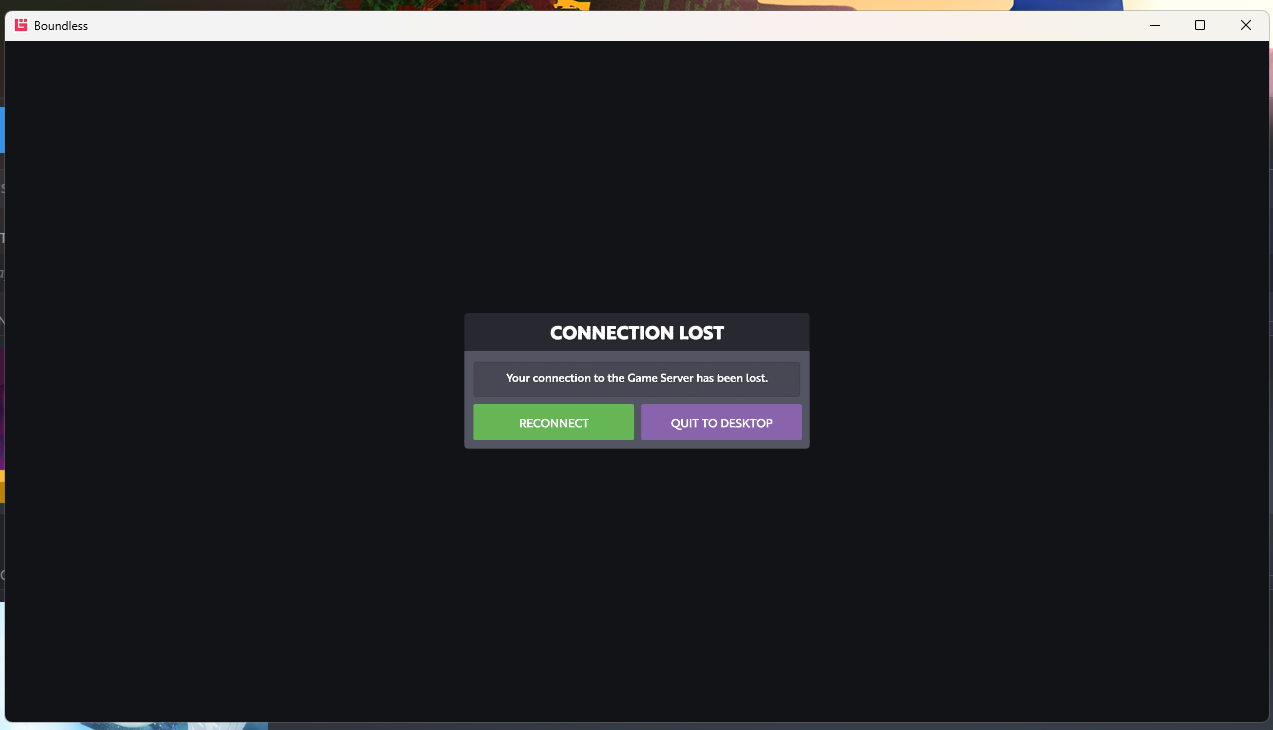
Making this thread for players to be able to post crash reports.
Let’s format them in a way that may help @jon-eric troubleshoot the issue.
Location: Trior
Time: 12:02PM EST
Actions being done: Mining
Notes: I had been mining for an hour and then crashed. I was using a speed hammer.
This is just a rough example, but please just use this format I’ll remove any other posts here as I want this to be as easy as possible for @jon-eric to see when, where and why these are happening. You can also post them in Discord and I’ll make sure they are duplicated here.
So in that folder there’s a backup log file from when I crashed and I’m not sure how to send it to you so I’ll just paste the last bunch of lines here:
[2025-10-19 15:28:32.399] [INFO] Loading config file: C:\Program Files (x86)\Steam\userdata\45393104\324510\local\user_settings\default\gameoptions.json
[2025-10-19 15:28:32.400] [INFO] Applying user customized game options:
[2025-10-19 15:28:32.400] [INFO] {
“creepToggle” : true,
“debugEnabled” : true,
“foliageQuality” : 3,
“fullPortalEffects” : 1,
“graphicsQuality” : -1,
“lastCharacter” : 31911,
“objectLodIndex” : 3,
“portalChunkScale” : 2.0,
“portalResolutionScale” : 1.0,
“quickUseDualSwitch” : false,
“quickUseHandedness” : 1,
“reflectionsResolutionScale” : 1.0,
“showContextualMessages” : false
}
[2025-10-19 15:28:32.400] [INFO] Loading config file: C:\Program Files (x86)\Steam\userdata\45393104\324510\local\user_settings\default\controls.json
[2025-10-19 15:28:32.400] [INFO] Loading config file: C:\Program Files (x86)\Steam\userdata\45393104\324510\local\user_settings\default\ownedworldnotify.json
[2025-10-19 15:28:32.773] [INFO] Loading attribute data
[2025-10-19 15:28:33.015] [INFO] Parsed item types data in 55.630700 ms
[2025-10-19 15:28:33.123] [INFO] Loading recipes
[2025-10-19 15:28:33.126] [INFO] Loading progression data
[2025-10-19 15:28:33.129] [INFO] Loading strings
[2025-10-19 15:28:33.130] [INFO] Set locale en_US
[2025-10-19 15:28:33.131] [INFO] Updating language mappings…
[2025-10-19 15:28:33.139] [WARN] Language is missing string for ID: “STACK_CATEGORY_CHANGE_TO_CREATURE_TROPHY”
[2025-10-19 15:28:33.139] [WARN] Language is missing string for ID: “STACK_CATEGORY_BAUBLE_BOMB”
[2025-10-19 15:28:33.139] [WARN] Language is missing string for ID: “STACK_CATEGORY_DECORATIVE_NATURAL”
[2025-10-19 15:28:33.139] [WARN] Language is missing string for ID: “STACK_CATEGORY_LIGHT_CUBE”
[2025-10-19 15:28:33.139] [WARN] Language is missing string for ID: “STACK_CATEGORY_SPARK”
[2025-10-19 15:28:33.139] [WARN] Language is missing string for ID: “STACK_CATEGORY_WORLD_CONTROL”
[2025-10-19 15:28:33.139] [WARN] Language is missing string for ID: “GUI_SUBMITLOG_DESCRIPTION”
[2025-10-19 15:28:33.139] [WARN] Language is missing string for ID: “GUI_DEATH_PENALTY_MESSAGE”
[2025-10-19 15:28:33.139] [WARN] Language is missing string for ID: “GUI_SUPPORT_TITLE”
[2025-10-19 15:28:33.292] [INFO] Loading compass data
[2025-10-19 15:28:33.296] [INFO] Loading config file: C:\Program Files (x86)\Steam\userdata\45393104\324510\local\user_settings\default\contextualmsgsstate.json
[2025-10-19 15:28:33.297] [INFO] Loading achievement data
[2025-10-19 15:28:33.302] [INFO] Parsed 59 platform achievements, skipped 1
[2025-10-19 15:28:33.302] [INFO] Loading event lighting config
[2025-10-19 15:28:33.302] [INFO] Loading news event data
[2025-10-19 15:28:45.576] [INFO] Parsing tree:assets/characters/cat_race/animation_map_firstperson.json
[2025-10-19 15:28:45.582] [INFO] Parsing tree:assets/characters/cat_race/animation_map_thirdperson.json
[2025-10-19 15:28:45.582] [INFO] Parsing tree:assets/characters/cat_race/animation_map_thirdperson_upperbodylayers.json
[2025-10-19 15:28:45.662] [INFO] Loading complete after 13.27s
[2025-10-19 15:28:45.907] [INFO] Creating 6 meshing threads
[2025-10-19 15:28:45.961] [INFO] GamestateAuthorising entered
[2025-10-19 15:28:45.961] [INFO] C:\Users\autobuild.jenkins\workspace\boundless-win64-deploy\native\src\steam\steam.cpp:924 (turbulenz::SteamServices::GetAuthSessionTicket) Got auth token (246 bytes)
[2025-10-19 15:28:45.961] [INFO] SetAuthStage TRY_AUTO_LOGIN
[2025-10-19 15:28:46.310] [INFO] SetAuthState CONNECTING
[2025-10-19 15:28:46.885] [INFO] SetAuthStage USER_INITIALISED
[2025-10-19 15:28:46.885] [INFO] Initializing client chunk cache
[2025-10-19 15:28:46.886] [INFO] Chunk Cache at C:\Program Files (x86)\Steam\userdata\45393104\324510\local\chunkcache
[2025-10-19 15:28:46.930] [INFO] C:\Users\autobuild.jenkins\workspace\boundless-win64-deploy\game\client\scripts\chunkcache\chunkcachedb.cpp:1013 (turbulenz::ChunkCacheDB::StartUpPurge) ChunkCacheDB data size: 703498537 (max: 1123024896)
[2025-10-19 15:28:46.930] [INFO] C:\Users\autobuild.jenkins\workspace\boundless-win64-deploy\game\client\scripts\chunkcache\chunkcachedb.cpp:1013 (turbulenz::ChunkCacheDB::StartUpPurge) PlanetCacheDB data size: 142716917 (max: 362807296)
[2025-10-19 15:28:46.952] [INFO] SetAuthStage NONE
[2025-10-19 15:28:46.952] [INFO] SetDiscoveryState LOGGING_IN
[2025-10-19 15:28:46.952] [INFO] Getting auth token for cjmarsh
[2025-10-19 15:28:47.042] [INFO] Sending login request for ‘cjmarsh’ to Discovery Server (https://ds.playboundless.com:8902)
[2025-10-19 15:28:47.388] [INFO] Received login response with status 200
[2025-10-19 15:28:47.389] [INFO] SetDiscoveryState LOGGED_IN
[2025-10-19 15:28:47.389] [INFO] SetAuthStage COMPLETED
[2025-10-19 15:28:47.389] [INFO] Loading config file: C:\Program Files (x86)\Steam\userdata\45393104\324510\local\user_settings\default\lastmsgtime.json
[2025-10-19 15:28:47.392] [INFO] C:\Users\autobuild.jenkins\workspace\boundless-win64-deploy\native\src\browserfeatures\httprequest.cpp:1227 (turbulenz::HttpRequest::Abort) Aborting HTTP request: https://ds.playboundless.com:8902/gameserverregions/cjmarsh
[2025-10-19 15:28:47.878] [INFO] got character with world 7620
[2025-10-19 15:28:47.886] [INFO] Initialised time limted events manager for world (id:4294967295)
[2025-10-19 15:28:47.887] [INFO] Joining world: (id:4294967295)
[2025-10-19 15:28:47.892] [INFO] Player entity added in world sanctum(id:4294967295) with id id:1
[2025-10-19 15:28:47.894] [INFO] Recording static attribute component archetype Block:14843378100900594118. Total = 1
[2025-10-19 15:28:47.894] [INFO] Created player start warp to world “7620”
[2025-10-19 15:28:48.059] [INFO] waiting for update on owned worlds before going to playing
[2025-10-19 15:28:48.066] [INFO] waiting for update on owned worlds before going to playing
[2025-10-19 15:28:48.073] [INFO] waiting for update on owned worlds before going to playing
[2025-10-19 15:28:48.080] [INFO] waiting for update on owned worlds before going to playing
[2025-10-19 15:28:48.087] [INFO] waiting for update on owned worlds before going to playing
[2025-10-19 15:28:48.094] [INFO] waiting for update on owned worlds before going to playing
[2025-10-19 15:28:48.101] [INFO] waiting for update on owned worlds before going to playing
[2025-10-19 15:28:48.108] [INFO] waiting for update on owned worlds before going to playing
[2025-10-19 15:28:48.115] [INFO] waiting for update on owned worlds before going to playing
[2025-10-19 15:28:48.121] [INFO] waiting for update on owned worlds before going to playing
[2025-10-19 15:28:48.128] [INFO] waiting for update on owned worlds before going to playing
[2025-10-19 15:28:48.135] [INFO] waiting for update on owned worlds before going to playing
[2025-10-19 15:28:48.142] [INFO] waiting for update on owned worlds before going to playing
[2025-10-19 15:28:48.149] [INFO] waiting for update on owned worlds before going to playing
[2025-10-19 15:28:48.156] [INFO] waiting for update on owned worlds before going to playing
[2025-10-19 15:28:48.163] [INFO] waiting for update on owned worlds before going to playing
[2025-10-19 15:28:48.170] [INFO] waiting for update on owned worlds before going to playing
[2025-10-19 15:28:48.175] [INFO] Update EOL for usw1_t0_1(7620) from {unset}->1763162514
[2025-10-19 15:28:48.175] [INFO] Update worldOwner for usw1_t0_1(7620) from {unset}->IS_OWNER
[2025-10-19 15:28:48.184] [INFO] Loading config file: C:\Program Files (x86)\Steam\userdata\45393104\324510\local\user_settings\default\newseventstates.json
[2025-10-19 15:28:48.185] [INFO] [sanctum(id:4294967295)] making portal 'id:-6 + b1071261373’to ‘7620’ active
[2025-10-19 15:28:48.187] [INFO] Initialised time limted events manager for world (id:7620)
[2025-10-19 15:28:48.188] [INFO] Connecting to ‘usw1_t0_1(id:7620)’ with address ‘wss://gs-live-usw1.playboundless.com/7620/websocket/game’ ip: 35.89.85.166
[2025-10-19 15:28:48.302] [INFO] WebSocket opened for usw1_t0_1(id:7620)
[2025-10-19 15:28:48.359] [INFO] Update displayName for usw1_t0_1(7620) from {unset}->Vannus
[2025-10-19 15:28:48.385] [INFO] Server Maintenance Status Update
[2025-10-19 15:28:48.385] [INFO] startTime: 1970-01-01 00:00:00 (0.000000)
[2025-10-19 15:28:48.385] [INFO] status:
[2025-10-19 15:28:48.552] [WARN] TimestampBoost changed for usw1_t0_1(id:7620). was 0.062500, now 0.125000
[2025-10-19 15:28:49.094] [INFO] Recording static attribute component archetype Block:130008471510894601. Total = 2
[2025-10-19 15:28:51.094] [INFO] Smashing portal
[2025-10-19 15:28:52.866] [INFO] Joining world: usw1_t0_1(id:7620)
[2025-10-19 15:28:52.867] [INFO] Player entity removed in world sanctum(id:4294967295) with id id:1
[2025-10-19 15:28:52.867] [INFO] [sanctum(id:4294967295)] making portal 'id:-6 + b1071261373’to ‘7620’ inactive
[2025-10-19 15:28:53.122] [INFO] Player entity added in world usw1_t0_1(id:7620) with id id:8001264
[2025-10-19 15:28:53.122] [INFO] Player entity removed in world usw1_t0_1(id:7620) with id id:-1
[2025-10-19 15:28:53.123] [INFO] no active portal to world sanctum(id:4294967295) disconnecting…
[2025-10-19 15:28:53.123] [INFO] Destroying game world sanctum(id:4294967295)
[2025-10-19 15:28:53.123] [INFO] WebSocket closed for sanctum(id:4294967295)
[2025-10-19 15:28:54.302] [INFO] > ClientTrustedSystem::OnEntityBecameTrusted: id:8001264 is now trusted on 317742.625000
[2025-10-19 15:29:52.141] [INFO] C:\Users\autobuild.jenkins\workspace\boundless-win64-deploy\native\src\core\tzprocess.cpp:148 (turbulenz::sMinidumpCallback) Process crashed and minidump was written to C:\Users\cjmar\AppData\Local\Turbulenz\Boundless\tblz_crashdump_20974826_b5e5a2a0-f611-4db8-82dd-834e91e0f5ee.mdmp
[2025-10-19 15:29:52.991] [INFO] C:\Users\autobuild.jenkins\workspace\boundless-win64-deploy\native\src\core\tzprocess.cpp:148 (turbulenz::sMinidumpCallback) Process crashed and minidump was written to C:\Users\cjmar\AppData\Local\Turbulenz\Boundless\tblz_crashdump_20974826_b5e5a2a0-f611-4db8-82dd-834e91e0f5ee.mdmp
Thank you! Can you send me the crash dump it created? I think you can use the “Upload” button and change the file type to “All Files (*.*)” to attach files other than pictures. I’m not sure where the crash dumps are getting sent to by default.
Sorry but I don’t see that file. The only other thing in the Boundless folder is a static-cache folder and the log files. In the static-cache folder there’s a tblz_responsecache.dat that seems like its too small to be anything useful but I’m not sure. Also, it says I can’t upload other file types besides png and jpeg and such when I try to message you, is there any email I can send it to? Is the boundless@turbulenz.com address still valid?
Edit: I double checked that hidden files were being shown in windows explorer and used ls -Force in powershell to make sure but I still dont see that crashdump file
Edit2: I did find some crash dumps from Windows in “C:\Users\cjmar\AppData\Local\CrashDumps” and they look like they match up with the crash times, they have the file names of “boundless.exe.11044.dmp” and similar numbers. There are also a series of repeats “boundless.exe(1).11044.dmp” in the same folder. Let me know if you want me to send any or all of them to you and where to send them or if I can do anything else, thanks.
Edit3: Emailed the files to the boundless@turbulenz address, figured it couldn’t hurt and worst case it can just be ignored until I get a different address to send to.
Just stumbled through a series of websocket closures, character disconnects and crashes myself. Sent a copy of the log to Support@boundless.com hopefully they can get to the bottom of it! 3am though USE… could just be ISPs playing hokey pokey with servers.
Just attempted to switch characters and got a “Can’t find Character”-type error. Restarted game and now get repeated Game Server - Connection Lost type errors. Feels like the main Game Server is not reachable.
My sovereigns say websocket closed so cant go on my sovereigns.yet all other portals in gane i can go through.my internets bt and 100 percent.Whats going on?ps5 im on
Yep i just come on gane and sats websocket offline so it wont let me go onto my sovereigns right now.yet all normal portals in gane i can freely walk through.why cant i go

 :ChunkCacheDB::StartUpPurge) ChunkCacheDB data size: 703498537 (max: 1123024896)